Want to Send WhatsApp Messages Later? Here's the New Feature You Should Know
WhatsApp introduces Scheduled Messages, allowing users to send texts, photos and videos later. Check how to schedule WhatsApp messages and use the new feature.

- Published
- Reading time
- 6 minutes
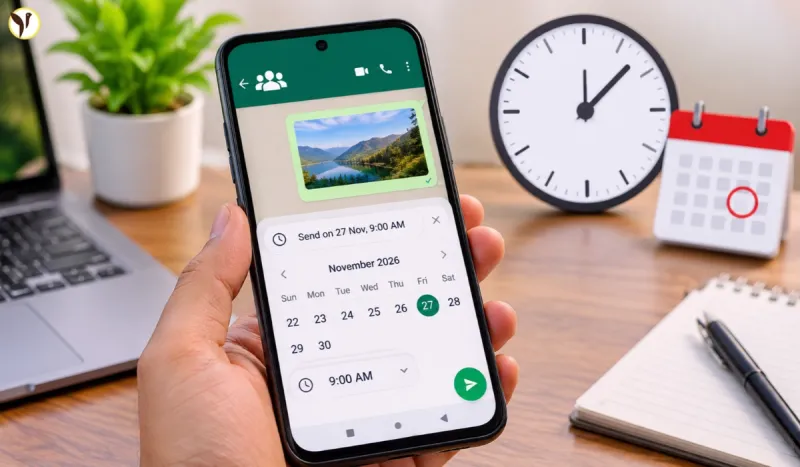
WhatsApp has finally introduced one of its most requested features, allowing users to schedule messages and send them automatically at a selected date and time. The new Scheduled Messages feature is designed for people who want to prepare a message in advance without having to remember to send it later.
The Meta-owned messaging platform announced the feature on November 25, 2026. It allows users to schedule messages anywhere from 10 minutes to 14 days in advance.
The feature works in both individual and group chats. Users can schedule text messages, photos and videos, making it useful for birthday wishes, important reminders, work updates and personal messages.
WhatsApp says the feature is rolling out globally over the coming weeks. This means some users may receive it before others.
WhatsApp Introduces Scheduled Messages: What Is the New Feature?
The new WhatsApp Scheduled Messages feature gives users more control over when their messages are delivered.
Earlier, users had to send messages immediately or depend on reminders and third-party tools to remember important messages. With the new update, they can write a message whenever they want and select a future delivery time.
For example, if someone wants to wish a friend at midnight on their birthday, they can prepare the message earlier and schedule it for exactly 12 AM.
Similarly, students can prepare good-luck messages before an examination, while office workers can schedule important updates for the next working day.
Once the selected time arrives, WhatsApp automatically delivers the message. The receiver sees it like a normal WhatsApp message and does not receive any special notification that it was scheduled.
How to Schedule WhatsApp Messages? Step-by-Step Guide
Using the new feature is simple. Users do not need to install any additional scheduling application.
Here is how to schedule a WhatsApp message:
- Open WhatsApp on your Android phone or iPhone.
- Open the individual or group chat where you want to send a message.
- Type the message you want to send.
- Press and hold the send button instead of tapping it normally.
- Select your preferred date and delivery time.
- Confirm the scheduling option.
- Your message will be saved and sent automatically at the selected time.
Users can schedule messages from 10 minutes to 14 days ahead.
The feature is designed to make messaging easier, especially for people who regularly communicate with friends, family members, colleagues and customers.
Can You Schedule WhatsApp Messages for 14 Days Later?
Yes. WhatsApp allows users to schedule messages up to 14 days in advance.
The minimum scheduling period is 10 minutes, which means users can choose a delivery time starting from 10 minutes after preparing the message.
This gives users enough flexibility to plan both short-term reminders and messages for upcoming events.
For example, someone can schedule a birthday greeting several days before the actual birthday. They can also prepare an important group announcement in advance instead of waiting until the last moment.
However, users cannot schedule messages beyond the 14-day limit under the current feature.
Can You Schedule Photos and Videos on WhatsApp?
Yes. The new feature is not limited to ordinary text messages.
WhatsApp also supports scheduled photos and videos. This makes the update more useful for people who regularly share media with friends, family members or groups.
For example, users can prepare a birthday photograph, a video greeting or an important visual update and select when it should be delivered.
The feature supports both individual conversations and group chats, although the exact options may depend on the version and rollout available to the account.
Will WhatsApp Send Scheduled Messages If Your Phone Is Turned Off?
One of the most useful parts of this update is that scheduled messages can still be delivered even if the sender's phone is switched off or has run out of battery.
According to WhatsApp, users do not need to keep their phones switched on or maintain an active internet connection at the scheduled delivery time.
This makes the feature different from basic reminders that only alert users to send a message themselves.
Once a message has been scheduled, WhatsApp handles its delivery at the selected time.
Users can therefore prepare messages in advance without worrying about keeping their phone active throughout the day.
How to View or Delete Scheduled WhatsApp Messages?
WhatsApp also gives users control over messages they have scheduled.
Users can view their upcoming scheduled messages and delete them before they are delivered.
This is useful when plans change or when someone decides that a particular message should not be sent.
For example, if a user schedules a message for a group but later changes their mind, they can remove the scheduled message before its delivery time.
The recipient will not receive the deleted scheduled message.
WhatsApp's official announcement confirms that users can see their future messages and delete them before they are sent.
Are WhatsApp Scheduled Messages End-to-End Encrypted?
Yes. WhatsApp has confirmed that scheduled messages retain the platform's end-to-end encryption.
This means the messages remain protected in the same way as regular personal WhatsApp conversations.
According to the company, nobody else, including WhatsApp itself, can read the contents of these personal messages.
Privacy remains an important part of the new feature, particularly for users who want to schedule personal conversations and important updates.
When Will the New WhatsApp Feature Be Available in India?
WhatsApp has announced a global rollout of Scheduled Messages over the coming weeks.
The feature is being introduced gradually, so it may not appear on every user's phone immediately.
Android and iPhone users should keep their WhatsApp applications updated through the Google Play Store or Apple App Store.
If the scheduling option is not available yet, users may need to wait until the feature reaches their account.
WhatsApp has not announced a separate fixed availability date for every country or user.
Why Is WhatsApp's Scheduled Messages Feature Important?
The new feature could make everyday communication easier for millions of WhatsApp users.
One of its biggest advantages is that users no longer need to remember to send every important message at the right time.
Some important uses include:
- Birthday Wishes: Users can schedule birthday greetings in advance and send them exactly at midnight.
- \Work Reminders: Office employees can prepare important updates and schedule them for the beginning of the working day.
- Examination Messages: Students can schedule good-luck messages for friends before important examinations.
- Family Communication: People living in different time zones can send messages at suitable times without staying awake.
- Group Announcements: Users can prepare information and schedule it for delivery in their WhatsApp groups.
The feature could also help people who use WhatsApp regularly for personal and professional communication.
WhatsApp Finally Adds a Feature Users Have Wanted for Years
Scheduled messaging has been available on some competing messaging platforms for a long time. However, WhatsApp users previously had to depend on workarounds or external tools to achieve similar results.
With this announcement, WhatsApp is bringing message scheduling directly into its own application.
The update is particularly important because WhatsApp is widely used for everyday communication, business conversations and group coordination.
The new feature could reduce the need for external scheduling applications and make communication more convenient.
Conclusion
WhatsApp's new Scheduled Messages feature is a major improvement for users who want better control over their communication.
From birthday wishes and personal reminders to office updates and group announcements, users can now prepare messages in advance and choose exactly when they should be delivered.
The ability to schedule messages up to 14 days ahead, support for photos and videos, offline delivery and end-to-end encryption make this update especially useful.
As the global rollout continues over the coming weeks, more Android and iPhone users are expected to receive access to this long-awaited feature.
Questions readers ask
What is the new Scheduled Messages feature on WhatsApp?
It allows users to write messages in advance and automatically send them at a selected date and time.
How far in advance can I schedule WhatsApp messages?
Users can schedule messages from 10 minutes to 14 days in advance.
How do I schedule a message on WhatsApp?
Open a chat, type your message, press and hold the send button, select a date and time, and confirm.
Can I schedule WhatsApp messages in group chats?
Yes. The feature supports both individual and group conversations.
Can I schedule photos and videos on WhatsApp?
Yes. WhatsApp supports scheduled text messages, photos and videos.