EPFO On WhatsApp: No More Office Visits? Check Your PF From Your Phone
EPFO has launched an official WhatsApp channel. Send "Hello" to check PF balance, claim status and recent transactions. Know the steps and safety tips.

- Published
- Reading time
- 3 minutes
Millions of provident fund members may now get their PF information on the app they use every day. The Employees' Provident Fund Organisation (EPFO) has launched an official WhatsApp channel for its members and pensioners. EPFO announced the channel in a post on X on September 13 and shared a QR code and a direct link for members to join.
What Has EPFO Launched?
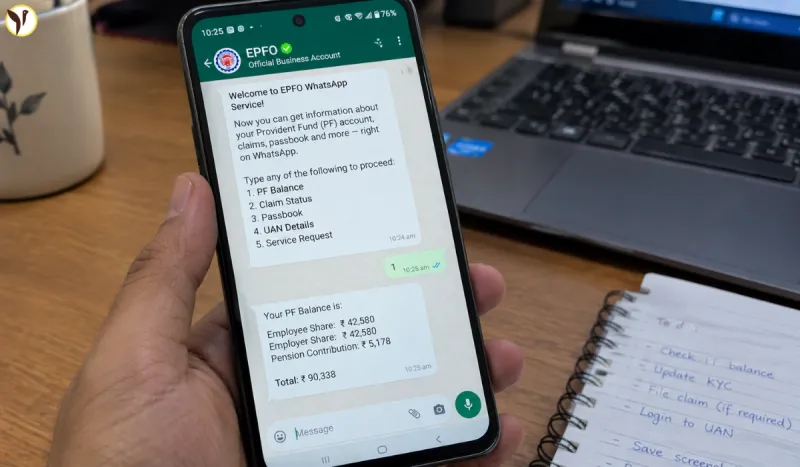
Members can begin a conversation by sending "Hello" to EPFO's verified WhatsApp number. The service is meant to make PF information quicker and easier to reach, especially for people who use a smartphone.
The aim is to give subscribers easy access to services such as PF balance, the last five transactions and claim status. Communication is also expected to be in local or vernacular languages, and the services are meant to be available 24/7.
What Can Members Do On WhatsApp?
According to reports, the platform is expected to offer these services:
- Check PF balance
- View the last five transactions
- Track claim status
- Get EPF passbook support
- Receive updates on new rules, schemes and circulars
The platform is also expected to help with Aadhaar authentication and DBT-related updates.
Step-by-Step: How to Join the Official EPFO WhatsApp Channel
Step 1: Open WhatsApp
Open WhatsApp on your smartphone.
Step 2: Go to Updates
Tap the Updates section in WhatsApp.
Step 3: Find Channels
Look for the Channels option and tap it.
Step 4: Search for EPFO
Use the search option and type EPFO.
Make sure you select the official and verified EPFO account. Do not follow random accounts claiming to provide PF services.
Step 5: Tap Follow
Once you find the official EPFO channel, tap Follow.
You can now receive EPFO-related announcements and important updates directly on WhatsApp.
How to Check Your PF Balance From Your Phone
If your main purpose is to check your PF balance, you still have official options.
Option 1: EPFO Member Portal
Open the official EPFO member service portal and log in using your UAN and required details.
From there, you can access available account and claim-related services.
Option 2: UMANG App
You can also use the UMANG app for EPFO services.
EPFO says its digital services include facilities such as passbook viewing, KYC-related services and claim submission.
Option 3: Missed Call Service
EPFO also provides a missed-call facility for members to get PF-related information.
The service should be used only from the mobile number registered with the UAN.
EPFO now on WhatsApp too!
— EPFO (@officialepfo) September 13, 2026
📢Join EPFO's official WhatsApp Channel to get important updates and useful information. Click on the link to join. https://t.co/k2KmISipxw #EPFO #EPFOWithYou #HumHainNa #EPFOWhatsAppChannel pic.twitter.com/mgLueBG1GD
Beware Of Fake Accounts
As EPFO expands to WhatsApp, members should be alert to impersonation and fraud, and use only EPFO's official and verified channels. Never share your OTP, UAN password or bank details with any unknown number or chat.
Part Of A Bigger Digital Push
The WhatsApp channel is one part of EPFO's wider digital plan. The labour ministry has said EPFO is working on UPI-based withdrawals, a higher auto-settlement limit, automatic PF transfer after a job change, and a centralised database to reduce delays. These services are said to be under testing before a nationwide rollout.
Why It Matters
For salaried workers, PF is long-term savings. Checking it usually means logging in to a portal or visiting an office. A simple chat on a familiar app can save time, especially for members who are not comfortable with complex websites.
Questions readers ask
Has EPFO launched an official WhatsApp service?
Yes. EPFO has launched an official WhatsApp channel and announced it on September 13. Some interactive services are being rolled out in phases.
How do I start using EPFO on WhatsApp?
Join EPFO's official verified channel and send "Hello". Then follow the menu options.
What can I check on EPFO's WhatsApp?
PF balance, last five transactions and claim status are expected. EPFO has not published a full official list yet.
Do I still need to visit an EPFO office?
For routine checks, you may not need to. But EPFO has not said the WhatsApp service replaces its other platforms, and some work may still need a portal login or an office visit.
Which mobile number should I use?
Use the mobile number registered with your UAN.
Can I check my PF balance without internet?
Yes. Send an SMS to 7738299899 or give a missed call to 9966044425 from your registered number.
How do I avoid fraud?
Use only EPFO's official verified channel and never share your OTP or password